Exclude Types of Terms to Enhance Search Results
Posted November 4, 2025
MedAbbrev has added the ability to exclude certain types of terms from search results. This new feature allows you to limit the types of results listed when you search which helps filter out terms to look at. The following is an example of how this feature works.
Enter “bcp” in the search box and click on [Search] and the following results will appear:
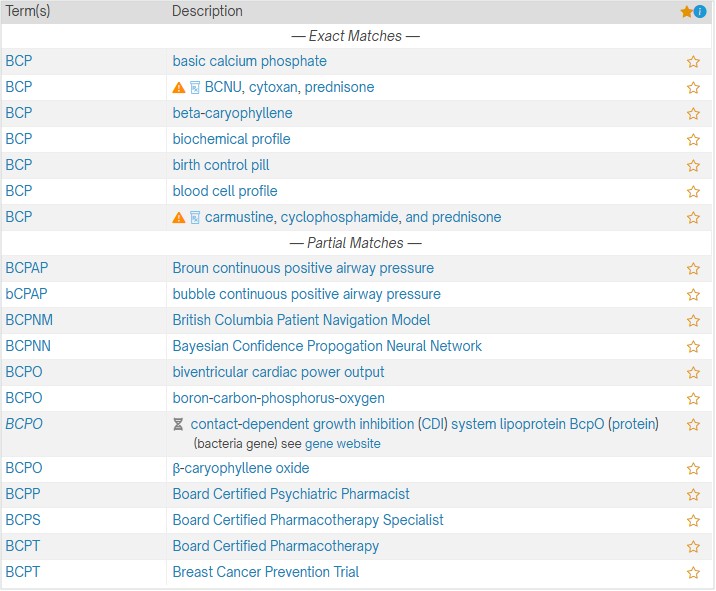
Under the “Partial Matches” there are a few “Board Certified” results and a gene. If you don’t want to see those in your results, use the new “Exclude from Search” option. Click on the “Exclude from Search” as shown below (yellow highlight):

Next, check the boxes you want to exclude from your search before you click on the [Search] button. See example image below:

Now, the search results look like this:
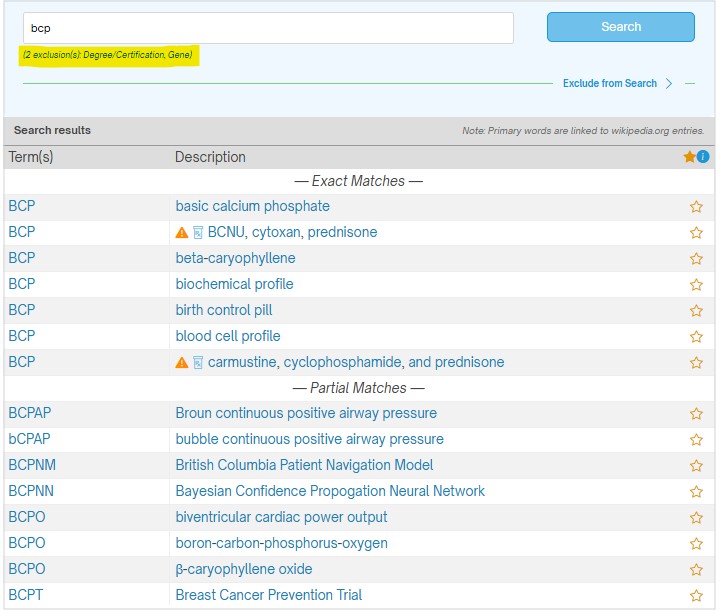
As you can see, the terms flagged with the type “Degree/Certification” or “Gene” no longer appear. You can always see what’s been excluded because it is displayed beneath the search box (see yellow highlight).
When there aren’t many matches within MedAbbrev, using the “Exclude from Search” may not be as useful. However, there are other times when it will be particularly helpful.
Please note that the following “types” are used within MedAbbrev:
- Degree/Certification: Includes doctors, healthcare professionals, specialized certifications, and department heads (e.g., Chief Medical Officer)
- Drug: Medications that are flagged with the drug icon (e.g., BCNU, cytoxan, prednisone) FDA Classification: Abbreviations found with the U.S. Food & Drug Administration’s Product Classification database
- Gene: Abbreviations found in the National Library of Medicine’s gene database are flagged with the gene icon
- Organization: group of people working together toward shared goals (e.g., American Medical Association)
- Trial: A medical trial is a controlled study in which researchers test a drug, treatment, or intervention on volunteers to evaluate its safety, effectiveness, and side effects before wider use (e.g., Breast Cancer Prevention Trial, Cardiovascular Abnormalities and Brain Lesions [study])
- Other: Any term not otherwise classified above
You can click as many of these options as you wish. If you were looking for a certain type of gene and you know it starts with “BC” but can’t remember the rest, click all the boxes except “Gene” as shown in the image below:

Now you can see the gene listings found within MedAbbrev that begin with the letters “bc”.
One word of caution, once you have clicked boxes, they remain your default so you’ll have to remember to uncheck them if you want to go back to a regular search. If the checkboxes are not showing, just click on the words “Exclude from Search” to see the checkboxes again.
Also added with this new feature: the heading for the results remains at the top when scrolling down the list. Just one more little thing to make your searches more helpful.
Happy searching.